作成日: 2025/08/19 最終更新日: 2025/08/19
文書種別
制限事項
状況
回避方法あり
詳細
マージした列を垂直方向にスクロールすると、2024J v1.1以降ではテキストが空白となります。
※それよりも前のバージョンでは、マージした範囲が表示領域から消えるまで文字が表示されます。
※それよりも前のバージョンでは、マージした範囲が表示領域から消えるまで文字が表示されます。
回避方法
2024J v1.1(ver.4.8.20241.672)で、より適切な動きになるよう仕様が変更され、本動作になりました。
テキストが空白になるのを避けるため、オーナー描画を使用してマージテキストの描画処理をカスタマイズできます。最初にC1FlexGridのDrawModeプロパティをOwnerDrawに設定し、OwnerDrawCellイベントにて、描画されたセルがマージされている場合、独自の描画処理を追加して、現在の表示領域の中央にテキストを描画します。
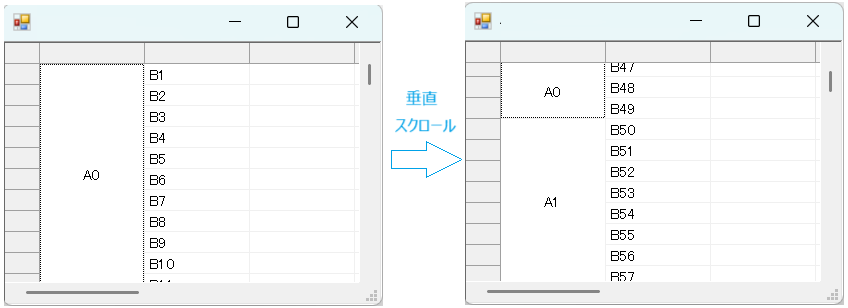
以下に独自の描画処理を設定するコードを記載します。
◎サンプルコード(VB)
テキストが空白になるのを避けるため、オーナー描画を使用してマージテキストの描画処理をカスタマイズできます。最初にC1FlexGridのDrawModeプロパティをOwnerDrawに設定し、OwnerDrawCellイベントにて、描画されたセルがマージされている場合、独自の描画処理を追加して、現在の表示領域の中央にテキストを描画します。
以下に独自の描画処理を設定するコードを記載します。
◎サンプルコード(VB)
Imports C1.Win.C1FlexGrid

Public Class Form1
    Private Sub Form1_Load(sender As Object, e As EventArgs) Handles MyBase.Load
        ' FlexGridの現在バージョンをウィンドウタイトルに表示
        Text = C1FlexGrid1.ProductVersion

        With C1FlexGrid1
            .Rows.Count = 1000 ' 行数を1000に設定
            .AllowMerging = AllowMergingEnum.RestrictAll
            .Cols(1).AllowMerging = True
            For i = 1 To .Rows.Count - 1
                .SetData(i, 1, $"A{i \ 50}")
                .SetData(i, 2, $"B{i}")
            Next

            .Cols(1).TextAlign = TextAlignEnum.CenterCenter
        End With

        ' ★回避策のポイント:セルの描画をカスタマイズするためにOwnerDrawモードに設定
        ' これにより、OwnerDrawCellイベントで描画処理を実装できます。
        C1FlexGrid1.DrawMode = DrawModeEnum.OwnerDraw
    End Sub

    '''
    ''' ★回避策のポイント:列ヘッダセルのカスタム描画処理
    ''' 水平スクロール時にマージされた列ヘッダが空白になる現象を回避します。
    '''
    Private Sub C1FlexGrid1_OwnerDrawCell(sender As Object, e As OwnerDrawCellEventArgs) Handles C1FlexGrid1.OwnerDrawCell
        ' グリッド参照
        Dim grid As C1.Win.C1FlexGrid.C1FlexGrid = CType(sender, C1.Win.C1FlexGrid.C1FlexGrid)
        Dim rng As CellRange = grid.GetMergedRange(e.Row, e.Col)

        ' データ行以外や計測時はデフォルト描画のみ
        If e.Row <> rng.r1 OrElse e.Col <> rng.c1 Then Return

        ' 結合セルの処理開始
        Debug.WriteLine($"マージセル ({rng.r1},{rng.c1})- ({rng.r2},{rng.c2}), データ:{rng.Data}")

        ' グリッドの表示範囲を取得
        Dim topRowVisible As Integer = grid.TopRow
        Dim bottomRowVisible As Integer = grid.BottomRow
        Dim leftColVisible As Integer = grid.LeftCol
        Dim rightColVisible As Integer = grid.RightCol

        ' マージ範囲が画面内に見えている部分の範囲を取得
        Dim rngTopRowVisible As Integer = Math.Max(rng.TopRow, topRowVisible)
        Dim rngBottomRowVisible As Integer = Math.Min(rng.BottomRow, bottomRowVisible)
        Dim rngLeftColVisible As Integer = Math.Max(rng.LeftCol, leftColVisible)
        Dim rngRightColVisible As Integer = Math.Min(rng.RightCol, rightColVisible)

        ' マージ範囲が見えている部分の矩形を取得
        Dim rectTop As Rectangle = grid.GetCellRect(rngTopRowVisible, e.Col, False)
        Dim rectBottom As Rectangle = grid.GetCellRect(rngBottomRowVisible, e.Col, False)
        Dim rectLeft As Rectangle = grid.GetCellRect(e.Row, rngLeftColVisible, False)
        Dim rectRight As Rectangle = grid.GetCellRect(e.Row, rngRightColVisible, False)

        Dim visibleHeight As Integer = rectBottom.Bottom - rectTop.Top
        Dim visibleWidth As Integer = rectRight.Right - rectLeft.Left

        ' テキスト描画領域(表示領域内に収める)
        Dim drawRect As New Rectangle(rectLeft.Left, rectTop.Top, visibleWidth, visibleHeight)

        ' 背景・枠線描画
        e.DrawCell(DrawCellFlags.Background Or DrawCellFlags.Border)
        e.Handled = True

        ' セルテキスト取得
        Dim cellText As String = Convert.ToString(grid(e.Row, e.Col))
        If String.IsNullOrEmpty(cellText) Then cellText = ""

        ' テキスト描画
        If grid.UseCompatibleTextRendering Then
            Using brush As New SolidBrush(e.Style.ForeColor)
                e.Graphics.DrawString(cellText, e.Style.Font, brush, drawRect, e.Style.StringFormat)
            End Using
        Else
            Dim flags As TextFormatFlags = GetTextFormatFlags(e.Style)
            TextRenderer.DrawText(e.Graphics, cellText, e.Style.Font, drawRect, e.Style.ForeColor, flags)
        End If
    End Sub

    '''
    ''' TextRenderer.DrawTextで使用するTextFormatFlagsを取得します。
    '''
    Private Function GetTextFormatFlags(style As CellStyle) As TextFormatFlags
        Dim flags As TextFormatFlags = TextFormatFlags.EndEllipsis Or TextFormatFlags.NoPrefix

        Select Case style.TextAlign
            Case TextAlignEnum.LeftTop, TextAlignEnum.LeftCenter, TextAlignEnum.LeftBottom
                flags = flags Or TextFormatFlags.Left
            Case TextAlignEnum.CenterTop, TextAlignEnum.CenterCenter, TextAlignEnum.CenterBottom
                flags = flags Or TextFormatFlags.HorizontalCenter
            Case TextAlignEnum.RightTop, TextAlignEnum.RightCenter, TextAlignEnum.RightBottom
                flags = flags Or TextFormatFlags.Right
            Case Else ' Generalなど
                flags = flags Or TextFormatFlags.Left
        End Select

        Select Case style.TextAlign
            Case TextAlignEnum.LeftTop, TextAlignEnum.CenterTop, TextAlignEnum.RightTop, TextAlignEnum.GeneralTop
                flags = flags Or TextFormatFlags.Top
            Case TextAlignEnum.LeftCenter, TextAlignEnum.CenterCenter, TextAlignEnum.RightCenter, TextAlignEnum.GeneralCenter
                flags = flags Or TextFormatFlags.VerticalCenter
            Case TextAlignEnum.LeftBottom, TextAlignEnum.CenterBottom, TextAlignEnum.RightBottom, TextAlignEnum.GeneralBottom
                flags = flags Or TextFormatFlags.Bottom
            Case Else
                flags = flags Or TextFormatFlags.VerticalCenter ' Generalの場合など
        End Select

        If style.WordWrap Then
            flags = flags Or TextFormatFlags.WordBreak
            flags = flags And Not TextFormatFlags.EndEllipsis ' WordBreak時はEndEllipsisを無効化
        End If

        Select Case style.Trimming
            Case StringTrimming.EllipsisWord
                flags = flags Or TextFormatFlags.WordEllipsis
            Case StringTrimming.EllipsisPath
                flags = flags Or TextFormatFlags.PathEllipsis
        End Select
        Return flags
    End Function
End Class using C1.Win.C1FlexGrid;
namespace FlexGrid_VerticalScroll_CS
{
public partial class Form1 : Form
{
public Form1()
{
InitializeComponent();
}
private void Form1_Load(object sender, EventArgs e)
{
// FlexGridの現在バージョンをウィンドウタイトルに表示
this.Text = c1FlexGrid1.ProductVersion;
var grid = c1FlexGrid1;
grid.Rows.Count = 1000; // 行数を1000に設定
grid.AllowMerging = AllowMergingEnum.RestrictAll;
grid.Cols[1].AllowMerging = true;
for (int i = 1; i < grid.Rows.Count; i++)
{
grid.SetData(i, 1, $"A{i / 50}");
grid.SetData(i, 2, $"B{i}");
}
grid.Cols[1].TextAlign = TextAlignEnum.CenterCenter;
// ★回避策のポイント:セルの描画をカスタマイズするためにOwnerDrawモードに設定
grid.DrawMode = DrawModeEnum.OwnerDraw;
}
/// <summary>
/// ★回避策のポイント:列ヘッダセルのカスタム描画処理
/// 水平スクロール時にマージされた列ヘッダが空白になる現象を回避します。
/// </summary>
private void c1FlexGrid1_OwnerDrawCell(object sender, OwnerDrawCellEventArgs e)
{
var grid = sender as C1FlexGrid;
var rng = grid.GetMergedRange(e.Row, e.Col);
// データ行以外や計測時はデフォルト描画のみ
if (e.Row < grid.Rows.Fixed || e.Measuring) return;
// マージセルのチェック
if (!rng.IsValid || rng.IsSingleCell || e.Row != rng.r1 || e.Col != rng.c1) return;
// 結合セルの処理開始
Debug.WriteLine($"マージセル ({rng.r1},{rng.c1}) - ({rng.r2},{rng.c2}), データ:{rng.Data}");
// グリッドの表示範囲を取得
int topRowVisible = grid.TopRow;
int bottomRowVisible = grid.BottomRow;
int leftColVisible = grid.LeftCol;
int rightColVisible = grid.RightCol;
// マージ範囲が画面内に見えている部分の範囲を取得
int rngTopRowVisible = Math.Max(rng.TopRow, topRowVisible);
int rngBottomRowVisible = Math.Min(rng.BottomRow, bottomRowVisible);
int rngLeftColVisible = Math.Max(rng.LeftCol, leftColVisible);
int rngRightColVisible = Math.Min(rng.RightCol, rightColVisible);
// マージ範囲が見えている部分の矩形を取得
Rectangle rectTop = grid.GetCellRect(rngTopRowVisible, e.Col, false);
Rectangle rectBottom = grid.GetCellRect(rngBottomRowVisible, e.Col, false);
Rectangle rectLeft = grid.GetCellRect(e.Row, rngLeftColVisible, false);
Rectangle rectRight = grid.GetCellRect(e.Row, rngRightColVisible, false);
int visibleHeight = rectBottom.Bottom - rectTop.Top;
int visibleWidth = rectRight.Right - rectLeft.Left;
// テキスト描画領域(表示領域内に収める)
Rectangle drawRect = new Rectangle(rectLeft.Left, rectTop.Top, visibleWidth, visibleHeight);
// 背景・枠線描画
e.DrawCell(DrawCellFlags.Background | DrawCellFlags.Border);
e.Handled = true;
// セルテキスト取得
string cellText = Convert.ToString(grid[e.Row, e.Col]) ?? "";
// テキスト描画
if (grid.UseCompatibleTextRendering)
{
using (SolidBrush brush = new SolidBrush(e.Style.ForeColor))
{
e.Graphics.DrawString(cellText, e.Style.Font, brush, drawRect, e.Style.StringFormat);
}
}
else
{
TextFormatFlags flags = GetTextFormatFlags(e.Style);
TextRenderer.DrawText(e.Graphics, cellText, e.Style.Font, drawRect, e.Style.ForeColor, flags);
}
}
/// <summary>
/// TextRenderer.DrawTextで使用するTextFormatFlagsを取得します。
/// </summary>
private TextFormatFlags GetTextFormatFlags(CellStyle style)
{
TextFormatFlags flags = TextFormatFlags.EndEllipsis | TextFormatFlags.NoPrefix;
switch (style.TextAlign)
{
case TextAlignEnum.LeftTop:
case TextAlignEnum.LeftCenter:
case TextAlignEnum.LeftBottom:
flags |= TextFormatFlags.Left;
break;
case TextAlignEnum.CenterTop:
case TextAlignEnum.CenterCenter:
case TextAlignEnum.CenterBottom:
flags |= TextFormatFlags.HorizontalCenter;
break;
case TextAlignEnum.RightTop:
case TextAlignEnum.RightCenter:
case TextAlignEnum.RightBottom:
flags |= TextFormatFlags.Right;
break;
default:
flags |= TextFormatFlags.Left;
break;
}
switch (style.TextAlign)
{
case TextAlignEnum.LeftTop:
case TextAlignEnum.CenterTop:
case TextAlignEnum.RightTop:
case TextAlignEnum.GeneralTop:
flags |= TextFormatFlags.Top;
break;
case TextAlignEnum.LeftCenter:
case TextAlignEnum.CenterCenter:
case TextAlignEnum.RightCenter:
case TextAlignEnum.GeneralCenter:
flags |= TextFormatFlags.VerticalCenter;
break;
case TextAlignEnum.LeftBottom:
case TextAlignEnum.CenterBottom:
case TextAlignEnum.RightBottom:
case TextAlignEnum.GeneralBottom:
flags |= TextFormatFlags.Bottom;
break;
default:
flags |= TextFormatFlags.VerticalCenter;
break;
}
if (style.WordWrap)
{
flags |= TextFormatFlags.WordBreak;
flags &= ~TextFormatFlags.EndEllipsis; // WordBreak時はEndEllipsisを無効化
}
switch (style.Trimming)
{
case StringTrimming.EllipsisWord:
flags |= TextFormatFlags.WordEllipsis;
break;
case StringTrimming.EllipsisPath:
flags |= TextFormatFlags.PathEllipsis;
break;
}
return flags;
}
}
}