作成日: 2021/05/18 最終更新日: 2021/05/18
文書種別
使用方法
詳細
BeforeAppointmentFormatイベントで、e引数のBackColor/BackColor2に同じ色を設定すると、予定の背景色は単色で表示されます。
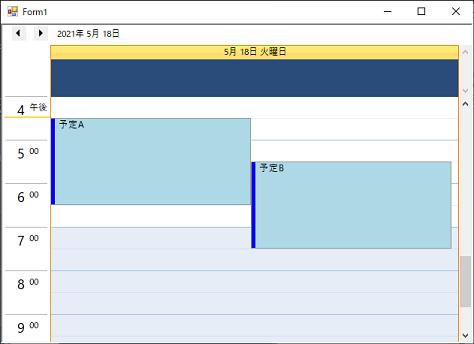
◎サンプルコード(VB)
    Private Sub C1Schedule1_BeforeAppointmentFormat(sender As Object, e As BeforeAppointmentFormatEventArgs) Handles C1Schedule1.BeforeAppointmentFormat
        e.BackColor = Color.LightBlue
        e.BackColor2 = Color.LightBlue
End Sub private void c1Schedule1_BeforeAppointmentFormat(object sender, C1.Win.C1Schedule.BeforeAppointmentFormatEventArgs e)
{
e.BackColor = Color.LightBlue;
e.BackColor2 = Color.LightBlue;
}BackColor/BackColor2に異なる色を設定すると、予定の背景色はグラデーション表示になります。
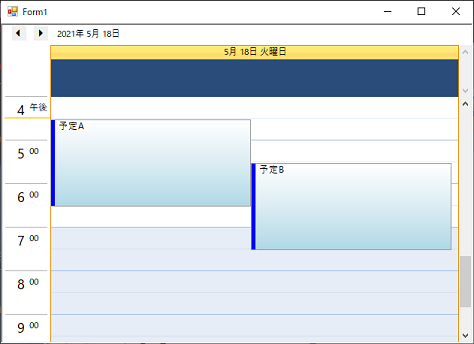
◎サンプルコード(VB)
    Private Sub C1Schedule1_BeforeAppointmentFormat(sender As Object, e As BeforeAppointmentFormatEventArgs) Handles C1Schedule1.BeforeAppointmentFormat
        e.BackColor = Color.White
        e.BackColor2 = Color.LightBlue
End Sub private void c1Schedule1_BeforeAppointmentFormat(object sender, C1.Win.C1Schedule.BeforeAppointmentFormatEventArgs e)
{
e.BackColor = Color.White;
e.BackColor2 = Color.LightBlue;
}