作成日: 2021/05/18 最終更新日: 2021/05/18
文書種別
使用方法
詳細
要件に合わせて個別に予定の背景色を変更するには、BeforeAppointmentFormatイベントで、条件に応じてe引数のBackColor/BackColor2を設定します。
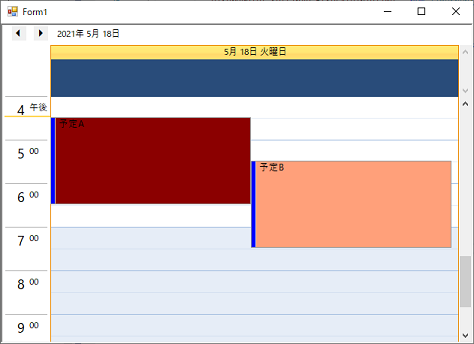
◎サンプルコード(VB)
Imports C1.Win.C1Schedule
Imports C1.C1Schedule

Public Class Form1
    Private Sub Form1_Load(sender As Object, e As EventArgs) Handles MyBase.Load
        ' 予定の作成
        Dim app As Appointment = C1Schedule1.DataStorage.AppointmentStorage.Appointments.Add()
        app.Start = DateTime.Now
        app.End = app.Start.AddHours(2)
        app.Subject = "予定A"
        Dim app2 As Appointment = C1Schedule1.DataStorage.AppointmentStorage.Appointments.Add()
        app2.Start = DateTime.Now.AddHours(1)
        app2.End = app2.Start.AddHours(2)
        app2.Subject = "予定B"

        ' 最初に表示する時間帯の指定
        C1Schedule1.Settings.FirstVisibleTime = New TimeSpan(DateTime.Now.Hour, 0, 0)
    End Sub

    Private Sub C1Schedule1_BeforeAppointmentFormat(sender As Object, e As BeforeAppointmentFormatEventArgs) Handles C1Schedule1.BeforeAppointmentFormat
        If e.Text = "予定A" Then
            e.BackColor = Color.DarkRed
            e.BackColor2 = Color.DarkRed
        ElseIf e.Text = "予定B" Then
            e.BackColor = Color.LightSalmon
            e.BackColor2 = Color.LightSalmon
        End If
    End Sub
End Classusing C1.Win.C1Schedule;
using C1.C1Schedule;
namespace WindowsFormsApp1
{
public partial class Form1 : Form
{
public Form1()
{
InitializeComponent();
}
private void Form1_Load(object sender, EventArgs e)
{
// 予定の作成
Appointment app = c1Schedule1.DataStorage.AppointmentStorage.Appointments.Add();
app.Start = DateTime.Now;
app.End = app.Start.AddHours(2);
app.Subject = "予定A";
Appointment app2 = c1Schedule1.DataStorage.AppointmentStorage.Appointments.Add();
app2.Start = DateTime.Now.AddHours(1);
app2.End = app2.Start.AddHours(2);
app2.Subject = "予定B";
// 最初に表示する時間の指定
c1Schedule1.Settings.FirstVisibleTime = new TimeSpan(DateTime.Now.Hour, 0, 0);
}
private void c1Schedule1_BeforeAppointmentFormat(object sender, C1.Win.C1Schedule.BeforeAppointmentFormatEventArgs e)
{
if ((e.Text == "予定A"))
{
e.BackColor = Color.DarkRed;
e.BackColor2 = Color.DarkRed;
}
else if ((e.Text == "予定B"))
{
e.BackColor = Color.LightSalmon;
e.BackColor2 = Color.LightSalmon;
}
}
}
}