作成日: 2022/02/28 最終更新日: 2022/02/28
文書種別
使用方法
詳細
Annotationオブジェクトを用いて、テキスト、線、図形などの注釈をグラフに追加することができます。 これらの注釈オブジェクトや表示テキストの色、およびフォントは、AnnotationオブジェクトのStyleやContentStyleを使用して設定します。
以下に、テキスト、線、正方形、長方形、円の各注釈の色とフォントを設定するコードを記載します。
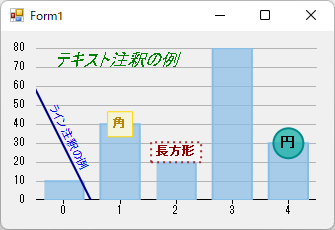
◎サンプルコード(VB)
以下に、テキスト、線、正方形、長方形、円の各注釈の色とフォントを設定するコードを記載します。
◎サンプルコード(VB)
Imports C1.Chart
Imports C1.Win.Chart
Imports C1.Chart.Annotation
Imports C1.Win.Chart.Annotation
Public Class Form1
    Private Sub Form1_Load(sender As Object, e As EventArgs) Handles MyBase.Load
        ' データテーブルの設定
        Dim dt As DataTable = New DataTable()
        dt.Columns.Add(New DataColumn("ID", GetType(Integer)))
        dt.Columns.Add(New DataColumn("個数", GetType(Integer)))
        dt.Rows.Add(0, 10)
        dt.Rows.Add(1, 40)
        dt.Rows.Add(2, 20)
        dt.Rows.Add(3, 80)
        dt.Rows.Add(4, 30)

        ' チャートタイプの設定
        FlexChart1.ChartType = ChartType.Column
        ' FlexChartへのバインド
        FlexChart1.DataSource = dt
        FlexChart1.BindingX = "ID"
        FlexChart1.Binding = "個数"
        FlexChart1.Series(0).Name = ""


        ' 注釈レイヤの作成
        Dim AnnotationLayer01 As AnnotationLayer = New AnnotationLayer(FlexChart1)

        ' テキスト注釈
        Dim annText As Text = New Text()
        annText.Content = "テキスト注釈の例"  ' テキスト
        annText.Attachment = AnnotationAttachment.Absolute ' 注釈の付加方法(Absolute=デフォルト)
        annText.Location = New PointF(50.0F, 30.0F)  ' 場所
        annText.Position = AnnotationPosition.Top  ' テキストの配置
        annText.Style.StrokeColor = Color.Green  ' テキストの色
        annText.Style.Font = New Font("MS ゴシック", 12, FontStyle.Italic)  ' フォント
        AnnotationLayer01.Annotations.Add(annText)

        ' 線注釈
        Dim annLine As Line = New Line()
        annLine.Content = "ライン注釈の例"  ' テキスト
        annLine.Attachment = AnnotationAttachment.Absolute ' 注釈の付加方法
        annLine.Start = New PointF(30.0F, 50.0F) ' 線の開始点
        annLine.End = New PointF(90.0F, 170.0F) ' 線の終了点
        annLine.ContentStyle.StrokeColor = Color.Blue  ' テキストの色
        annLine.Style.StrokeColor = Color.DarkBlue  ' 線の色
        annLine.Style.Font = New Font("MS ゴシック", 12, FontStyle.Italic)  ' フォント
        AnnotationLayer01.Annotations.Add(annLine)

        ' 正方形の注釈
        Dim annSquare As Square = New Square("角")
        annSquare.Length = 25  ' 正方形の幅と高さ
        annSquare.Attachment = AnnotationAttachment.DataIndex  ' 注釈の付加方法
        annSquare.SeriesIndex = 0  ' 注釈を付加するシリーズの番号
        annSquare.PointIndex = 1  ' 注釈を付加するデータの番号
        annSquare.Style.FillColor = Color.Beige  ' 背景色
        annSquare.Style.StrokeColor = Color.Gold  ' 枠の色
        annSquare.Style.StrokeWidth = 1  ' 枠の太さ
        annSquare.Style.LinePattern = LinePatternEnum.Solid  ' 枠のパターン
        annSquare.ContentStyle.StrokeColor = Color.DarkGoldenrod  ' テキストの色
        annSquare.ContentStyle.Font = New Font("MS ゴシック", 8.5F, FontStyle.Bold)  ' フォント
        annSquare.Position = AnnotationPosition.Center  ' テキストの配置
        AnnotationLayer01.Annotations.Add(annSquare)

        ' 長方形の注釈
        Dim annRect As Rectangle = New Rectangle("長方形")
        annRect.Width = 50  ' 長方形の幅
        annRect.Height = 20  ' 長方形の高さ
        annRect.Attachment = AnnotationAttachment.DataIndex  ' 注釈の付加方法
        annRect.SeriesIndex = 0  ' 注釈を付加するシリーズの番号
        annRect.PointIndex = 2  ' 注釈を付加するデータの番号
        annRect.Style.FillColor = Color.FromArgb(100, Color.Transparent)  ' 背景色(透過の例)
        annRect.Style.StrokeColor = Color.Brown  ' 枠の色
        annRect.Style.StrokeWidth = 2  ' 枠の太さ
        annRect.Style.LinePattern = LinePatternEnum.Dot  ' 枠のパターン
        annRect.ContentStyle.StrokeColor = Color.DarkRed  ' テキストの色
        annRect.ContentStyle.Font = New Font("MS ゴシック", 8.5F, FontStyle.Bold)  ' フォント
        annRect.Position = AnnotationPosition.Top  ' テキストの配置
        AnnotationLayer01.Annotations.Add(annRect)

        ' 円形の注釈
        Dim annCircle As Circle = New Circle("円")
        annCircle.Radius = 15  ' 円の半径
        annCircle.Attachment = AnnotationAttachment.DataIndex  ' 注釈の付加方法
        annCircle.SeriesIndex = 0  ' 注釈を付加するシリーズの番号
        annCircle.PointIndex = 4  ' 注釈を付加するデータの番号
        annCircle.ContentStyle.StrokeColor = Color.Black  ' テキストの色
        annCircle.ContentStyle.Font = New System.Drawing.Font("MS ゴシック", 10, FontStyle.Bold)  ' フォント
        annCircle.Style.FillColor = Color.FromArgb(200, Color.LightSeaGreen)  ' 背景色(透過の例)
        annCircle.Style.StrokeColor = Color.DarkCyan  ' 枠の色
        annCircle.Style.StrokeWidth = 2  ' 枠の太さ
        AnnotationLayer01.Annotations.Add(annCircle)
    End Sub
End Classusing C1.Chart;
using C1.Win.Chart;
using C1.Chart.Annotation;
using C1.Win.Chart.Annotation;
namespace prj_C1FlexChart
{
public partial class Form1 : Form
{
public Form1()
{
InitializeComponent();
//データテーブルの設定
DataTable dt = new DataTable();
dt.Columns.Add(new DataColumn("ID", typeof(Int32)));
dt.Columns.Add(new DataColumn("個数", typeof(Int32)));
dt.Rows.Add(0, 10);
dt.Rows.Add(1, 40);
dt.Rows.Add(2, 20);
dt.Rows.Add(3, 80);
dt.Rows.Add(4, 30);
// チャートタイプの設定
flexChart1.ChartType = ChartType.Column;
// FlexChartへのバインド
flexChart1.DataSource = dt;
flexChart1.BindingX = "ID";
flexChart1.Binding = "個数";
flexChart1.Series[0].Name = "";
}
private void Form1_Load(object sender, EventArgs e)
{
// 注釈レイヤの作成
AnnotationLayer annotationLayer01 = new AnnotationLayer(flexChart1);
// テキスト注釈
Text annText = new Text();
annText.Content = "テキスト注釈の例"; // テキスト
annText.Attachment = AnnotationAttachment.Absolute; // 注釈の付加方法(Absolute=デフォルト)
annText.Location = new PointF(50F, 30F); // 場所
annText.Position = AnnotationPosition.Top; // テキストの配置
annText.Style.StrokeColor = Color.Green; // テキストの色
annText.Style.Font = new Font("MS ゴシック", 12, FontStyle.Italic); // フォント
annotationLayer01.Annotations.Add(annText);
// 線注釈
Line annLine = new Line();
annLine.Content = "ライン注釈の例"; // テキスト
annLine.Attachment = AnnotationAttachment.Absolute; // 注釈の付加方法
annLine.Start = new PointF(30F, 50F); // 線の開始点
annLine.End = new PointF(90F, 170F); // 線の終了点
annLine.ContentStyle.StrokeColor = Color.Blue; // テキストの色
annLine.Style.StrokeColor = Color.DarkBlue; // 線の色
annLine.Style.Font = new Font("MS ゴシック", 12, FontStyle.Italic); // フォント
annotationLayer01.Annotations.Add(annLine);
// 正方形の注釈
Square annSquare = new Square("角");
annSquare.Length = 25; // 正方形の幅と高さ
annSquare.Attachment = AnnotationAttachment.DataIndex; // 注釈の付加方法
annSquare.SeriesIndex = 0; // 注釈を付加するシリーズの番号
annSquare.PointIndex = 1; // 注釈を付加するデータの番号
annSquare.Style.FillColor = Color.Beige; // 背景色
annSquare.Style.StrokeColor = Color.Gold; // 枠の色
annSquare.Style.StrokeWidth = 1; // 枠の太さ
annSquare.Style.LinePattern = LinePatternEnum.Solid; // 枠のパターン
annSquare.ContentStyle.StrokeColor = Color.DarkGoldenrod; // テキストの色
annSquare.ContentStyle.Font = new Font("MS ゴシック", 8.5F, FontStyle.Bold); // フォント
annSquare.Position = AnnotationPosition.Center; // テキストの配置
annotationLayer01.Annotations.Add(annSquare);
// 長方形の注釈
C1.Win.Chart.Annotation.Rectangle annRect = new C1.Win.Chart.Annotation.Rectangle("長方形");
annRect.Width = 50; // 長方形の幅
annRect.Height = 20; // 長方形の高さ
annRect.Attachment = AnnotationAttachment.DataIndex; // 注釈の付加方法
annRect.SeriesIndex = 0; // 注釈を付加するシリーズの番号
annRect.PointIndex = 2; // 注釈を付加するデータの番号
annRect.Style.FillColor = Color.FromArgb(100, Color.Transparent); // 背景色(透過の例)
annRect.Style.StrokeColor = Color.Brown; // 枠の色
annRect.Style.StrokeWidth = 2; // 枠の太さ
annRect.Style.LinePattern = LinePatternEnum.Dot; // 枠のパターン
annRect.ContentStyle.StrokeColor = Color.DarkRed; // テキストの色
annRect.ContentStyle.Font = new Font("MS ゴシック", 8.5F, FontStyle.Bold); // フォント
annRect.Position = AnnotationPosition.Top; // テキストの配置
annotationLayer01.Annotations.Add(annRect);
// 円形の注釈
Circle annCircle = new Circle("円");
annCircle.Radius = 15; // 円の半径
annCircle.Attachment = AnnotationAttachment.DataIndex; // 注釈の付加方法
annCircle.SeriesIndex = 0; // 注釈を付加するシリーズの番号
annCircle.PointIndex = 4; // 注釈を付加するデータの番号
annCircle.ContentStyle.StrokeColor = Color.Black; // テキストの色
annCircle.ContentStyle.Font = new System.Drawing.Font("MS ゴシック", 10, FontStyle.Bold); // フォント
annCircle.Style.FillColor = Color.FromArgb(200, Color.LightSeaGreen); // 背景色(透過の例)
annCircle.Style.StrokeColor = Color.DarkCyan; // 枠の色
annCircle.Style.StrokeWidth = 2; // 枠の太さ
annotationLayer01.Annotations.Add(annCircle);
}
}
}