作成日: 2022/09/06 最終更新日: 2022/09/06
文書種別
使用方法
詳細
列のAllowFilteringプロパティを「ByCondition」に設定しフィルタアイコンをクリックすると、条件フィルタ(ConditionFilter)がドロップダウンします。
このとき、抽出条件を示すプルダウンおよび文字入力のためのテキストボックスの幅を変更するには、MouseClickイベントにて条件フィルタの内部コントロールを取得し、その幅を設定します。
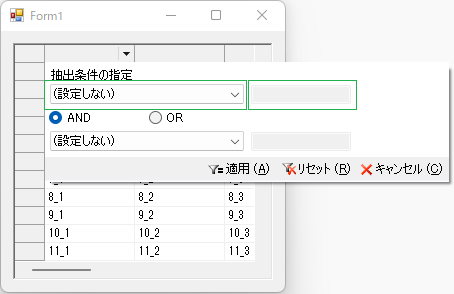
以下に、簡単な設定例を記載します。
◎サンプルコード(VB)
このとき、抽出条件を示すプルダウンおよび文字入力のためのテキストボックスの幅を変更するには、MouseClickイベントにて条件フィルタの内部コントロールを取得し、その幅を設定します。
以下に、簡単な設定例を記載します。
◎サンプルコード(VB)
Imports C1.Win.C1FlexGrid

Public Class Form1
    Private Sub Form1_Load(sender As Object, e As EventArgs) Handles MyBase.Load
        ' 値の設定
        For i = 1 To C1FlexGrid1.Rows.Count - 1
            For j = 1 To C1FlexGrid1.Cols.Count - 1
                C1FlexGrid1(i, j) = $"{i}_{j}"
            Next
        Next

        ' フィルタの設定
        C1FlexGrid1.AllowSorting = False
        C1FlexGrid1.AllowFiltering = True
        C1FlexGrid1.Cols(1).AllowFiltering = AllowFiltering.ByCondition
    End Sub

    Private Sub C1FlexGrid1_MouseClick(sender As Object, e As MouseEventArgs) Handles C1FlexGrid1.MouseClick
        ' フィルタドロップダウンの調節
        Dim htInfo = C1FlexGrid1.HitTest()
        If htInfo.Type = HitTestTypeEnum.FilterIcon Then
            ' ByConditionの場合
            If C1FlexGrid1.Cols(htInfo.Column).AllowFiltering = AllowFiltering.ByCondition Then
                For Each frm As Form In Application.OpenForms
                    If frm.GetType().FullName = "C1.Win.C1FlexGrid.FilterEditorForm" Then
                        Dim Panel = DirectCast(frm.Controls(1).Controls(0), TableLayoutPanel)
                        Panel.ColumnStyles(0).Width = 100
                        Panel.ColumnStyles(1).Width = 100
                        Panel.ColumnStyles(2).Width = 200  'コンボボックス
                        For Each c In frm.Controls(1).Controls(0).Controls
                            If TypeOf c Is TextBox Then
                                c.Width = 100  'テキストボックス
                            End If
                        Next
                    End If
                Next
            End If
        End If
    End Sub
End Classusing C1.Win.C1FlexGrid;
namespace prj_C1FlexGrid
{
public partial class Form1 : Form
{
public Form1()
{
InitializeComponent();
//c1FlexGrid1.Rows.Count = 11;
//c1FlexGrid1.Cols.Count = 5;
for (int i = 1; i < c1FlexGrid1.Rows.Count; i++)
{
for (int j = 1; j < c1FlexGrid1.Cols.Count; j++)
{
c1FlexGrid1[i, j] = $"{i}_{j}";
}
}
c1FlexGrid1.AllowSorting = AllowSortingEnum.None;
c1FlexGrid1.AllowFiltering = true;
c1FlexGrid1.Cols[1].AllowFiltering = AllowFiltering.ByCondition;
}
private void c1FlexGrid1_MouseClick(object sender, MouseEventArgs e)
{
// フィルタドロップダウンの調節
var htInfo = c1FlexGrid1.HitTest();
if ((htInfo.Type == HitTestTypeEnum.FilterIcon))
{
// ByConditionの場合
if ((c1FlexGrid1.Cols[htInfo.Column].AllowFiltering == AllowFiltering.ByCondition))
{
foreach (Form frm in Application.OpenForms)
{
if ((frm.GetType().FullName == "C1.Win.C1FlexGrid.FilterEditorForm"))
{
var Panel = (TableLayoutPanel) frm.Controls[1].Controls[0];
Panel.ColumnStyles[0].Width = 100;
Panel.ColumnStyles[1].Width = 100;
Panel.ColumnStyles[2].Width = 200; //コンボボックス
foreach (object c in frm.Controls[1].Controls[0].Controls)
{
if (c.GetType() == typeof(TextBox))
{
((TextBox)c).Width = 100; //テキストボックス
}
}
}
}
}
}
}
}
}