作成日: 2022/10/27 最終更新日: 2022/10/27
文書種別
使用方法
詳細
設計時にC1ThemeControllerのスマートタグから「テーマの設定」を選択すると、アプリ全体に関する以下の設定を行うことができます。
① アプリケーションテーマ
② C1ThemeController1 テーマ
これらの2つの設定の違いは、次のようになります。
■アプリケーションテーマ
アプリケーションのすべての C1ThemeController コンポーネントに適用され、すべてのフォームに対して共通です。
通常、この値は App.config に保存されます。
■ C1ThemeController1 テーマ
C1ThemeController の特定のインスタンスにのみ適用されます。
なお、その「デフォルト」テーマには「アプリケーション テーマ」が反映されます。
確認サンプル
これらの動作を確認するためのサンプル作成手順は以下の通りです。
(1) 新規プロジェクトを作成し、C1ThemeControllerを2個、LabelとComboBoxを各3個ずつフォーム上に貼り付けます。
(2) C1ThemeControllerのスマートタグから「テーマの設定」を選択し、下記テーマを "(default)" に設定します。
※アプリケーションテーマには何も設定しません。
・C1ThemeController1の設定:c1ThemeController1 テーマ、label2、comboBox2
・C1ThemeController2の設定:c1ThemeController2 テーマ、label3、comboBox3
(3) 後述するサンプルコードを記載します。
(4) プロジェクトを実行し、各ComboBoxからテーマ名を選択します。
・ComboBox1:"Office2016DartGray"
・ComboBox2:"Office2016Black"
・ComboBox3:"Office2016White"
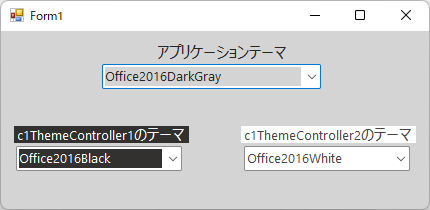
(結果)
フォーム全体がグレーで、Label2とComboBox2が黒く、Label3とComboBox3が白く表示されます。
◎サンプルコード(VB)
① アプリケーションテーマ
② C1ThemeController1 テーマ
これらの2つの設定の違いは、次のようになります。
■アプリケーションテーマ
アプリケーションのすべての C1ThemeController コンポーネントに適用され、すべてのフォームに対して共通です。
通常、この値は App.config に保存されます。
■ C1ThemeController1 テーマ
C1ThemeController の特定のインスタンスにのみ適用されます。
なお、その「デフォルト」テーマには「アプリケーション テーマ」が反映されます。
確認サンプル
これらの動作を確認するためのサンプル作成手順は以下の通りです。
(1) 新規プロジェクトを作成し、C1ThemeControllerを2個、LabelとComboBoxを各3個ずつフォーム上に貼り付けます。
(2) C1ThemeControllerのスマートタグから「テーマの設定」を選択し、下記テーマを "(default)" に設定します。
※アプリケーションテーマには何も設定しません。
・C1ThemeController1の設定:c1ThemeController1 テーマ、label2、comboBox2
・C1ThemeController2の設定:c1ThemeController2 テーマ、label3、comboBox3
(3) 後述するサンプルコードを記載します。
(4) プロジェクトを実行し、各ComboBoxからテーマ名を選択します。
・ComboBox1:"Office2016DartGray"
・ComboBox2:"Office2016Black"
・ComboBox3:"Office2016White"
(結果)
フォーム全体がグレーで、Label2とComboBox2が黒く、Label3とComboBox3が白く表示されます。
◎サンプルコード(VB)
Imports C1.Win.C1Themes

Public Class Form1
    Private Sub Form1_Load(sender As Object, e As EventArgs) Handles MyBase.Load
        ' テーマ選択コンボボックスを初期化(c1ThemeController1)
        For Each theme As String In C1ThemeController.GetThemes
            If (theme.Contains("Office2016") = True) Then
                Me.comboBox1.Items.Add(theme)
                Me.comboBox2.Items.Add(theme)
                Me.comboBox3.Items.Add(theme)
            End If
        Next
    End Sub

    ' アプリケーションテーマの設定
    Private Sub comboBox1_SelectedIndexChanged(sender As Object, e As EventArgs) Handles comboBox1.SelectedIndexChanged
        Dim combo As ComboBox = CType(sender, ComboBox)
        If (Not (combo) Is Nothing) Then
            Dim themeName As String = CType(combo.SelectedItem, String)
            Dim theme = C1ThemeController.GetThemeByName(themeName, False)
            C1ThemeController.ApplyThemeToControlTree(Me, theme)
        End If
    End Sub

    ' C1ThemeController1のテーマ設定
    Private Sub comboBox2_SelectedIndexChanged(sender As Object, e As EventArgs) Handles comboBox2.SelectedIndexChanged
        Dim combo As ComboBox = CType(sender, ComboBox)
        If (Not (combo) Is Nothing) Then
            Dim theme As String = CType(combo.SelectedItem, String)
            Me.C1ThemeController1.Theme = theme
        End If
    End Sub

    ' C1ThemeController2のテーマ設定
    Private Sub comboBox3_SelectedIndexChanged(sender As Object, e As EventArgs) Handles comboBox3.SelectedIndexChanged
        Dim combo As ComboBox = CType(sender, ComboBox)
        If (Not (combo) Is Nothing) Then
            Dim theme As String = CType(combo.SelectedItem, String)
            Me.C1ThemeController2.Theme = theme
        End If
    End Sub
End Classusing C1.Win.C1Themes;
namespace WindowsFormsApp1
{
public partial class Form1 : Form
{
public Form1()
{
InitializeComponent();
// テーマ選択コンボボックスを初期化(c1ThemeController1)
foreach (string theme in C1ThemeController.GetThemes())
{
if (theme.Contains("Office2016") == true)
{
this.comboBox1.Items.Add(theme);
this.comboBox2.Items.Add(theme);
this.comboBox3.Items.Add(theme);
}
}
}
// アプリケーションテーマの設定
private void comboBox1_SelectedIndexChanged(object sender, EventArgs e)
{
ComboBox combo = sender as ComboBox;
if (combo != null)
{
string themeName = combo.SelectedItem as string;
var theme = C1ThemeController.GetThemeByName(themeName, false);
C1ThemeController.ApplyThemeToControlTree(this, theme);
}
}
// C1ThemeController1のテーマ設定
private void comboBox2_SelectedIndexChanged(object sender, EventArgs e)
{
ComboBox combo = sender as ComboBox;
if (combo != null)
{
string theme = combo.SelectedItem as string;
this.c1ThemeController1.Theme = theme;
}
}
// C1ThemeController2のテーマ設定
private void comboBox3_SelectedIndexChanged(object sender, EventArgs e)
{
ComboBox combo = sender as ComboBox;
if (combo != null)
{
string theme = combo.SelectedItem as string;
this.c1ThemeController2.Theme = theme;
}
}
}
}