作成日: 2023/02/17 最終更新日: 2023/02/17
文書種別
使用方法
詳細
データ連結しているグリッドの場合、RowCollectionクラスの InsertNodeメソッドを使用しノード行(*)を追加して階層構造を作成し、これをツリー表示することができます。
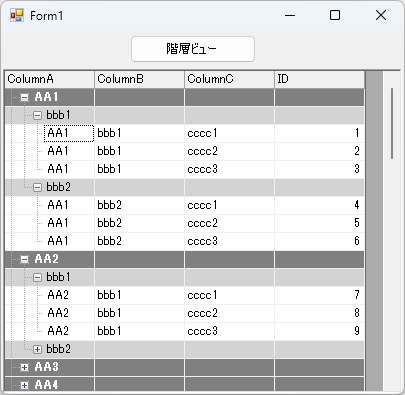
* ノード行については、こちらのナレッジをご参照ください。
この場合、C1FlexGridが用意しているSubtotalメソッドやGroupDescriptionsプロパティを使わず、独自のGroupBy関数を定義してグループ化を行います。この関数の中で、同じデータ値ごとにノード行(*)を挿入してグループとし、階層構造を作成します。
なお、グループ化に使用する列のデータは、事前にソートしておきます。次に、C1FlexGridのTree.Columnプロパティを用いてツリーが表示される列を指定し、Tree.StyleをSimpleLeafに設定します。
以下に、簡単な設定コードを記載します。
◎サンプルコード(VB)
* ノード行については、こちらのナレッジをご参照ください。
この場合、C1FlexGridが用意しているSubtotalメソッドやGroupDescriptionsプロパティを使わず、独自のGroupBy関数を定義してグループ化を行います。この関数の中で、同じデータ値ごとにノード行(*)を挿入してグループとし、階層構造を作成します。
なお、グループ化に使用する列のデータは、事前にソートしておきます。次に、C1FlexGridのTree.Columnプロパティを用いてツリーが表示される列を指定し、Tree.StyleをSimpleLeafに設定します。
以下に、簡単な設定コードを記載します。
◎サンプルコード(VB)
Imports C1.Win.C1FlexGrid
Public Class Form1
    Private Sub Form1_Load(sender As Object, e As EventArgs) Handles MyBase.Load
        ' データの作成
        Dim dt As DataTable = New DataTable("TEST")
        dt.Columns.Add("ColumnA", GetType(String))
        dt.Columns.Add("ColumnB", GetType(String))
        dt.Columns.Add("ColumnC", GetType(String))
        dt.Columns.Add("ID", GetType(Int32))

        Dim iID As Integer = 0
        For i As Integer = 0 To 9
            For j As Integer = 0 To 1
                For k As Integer = 0 To 2
                    iID += 1
                    dt.Rows.Add("AA" & i.ToString(), "bbb" & j.ToString(), "cccc" & k.ToString(), iID)
                Next
            Next
        Next
        dt.AcceptChanges()

        ' FlexGridの設定
        C1FlexGrid1.DataSource = dt
        C1FlexGrid1.Cols.Fixed = 0
    End Sub

    Private Sub button1_Click(sender As Object, e As EventArgs) Handles button1.Click
        ' グループ化
        GroupBy(C1FlexGrid1, "ColumnA", 1)
        GroupBy(C1FlexGrid1, "ColumnB", 2)

        ' ツリーの設定
        C1FlexGrid1.Tree.Column = 0
        C1FlexGrid1.Tree.Style = TreeStyleFlags.SimpleLeaf
        C1FlexGrid1.Tree.Show(1)
    End Sub

    Private Sub GroupBy(ByVal grid As C1FlexGrid, ByVal columnName As String, ByVal level As Integer)
        ' ちらつき防止
        C1FlexGrid1.Redraw = False

        ' レベル1でグループのスタイル設定
        Dim s1 As CellStyle = grid.Styles.Add("Group0")
        s1.BackColor = Color.Gray
        s1.ForeColor = Color.White
        s1.Font = New Font(grid.Font, FontStyle.Bold)
        ' レベル2でグループのスタイル設定
        Dim s2 As CellStyle = grid.Styles.Add("Group1")
        s2.BackColor = Color.LightGray
        s2.ForeColor = Color.Black
        Dim current As Object = Nothing
        Dim r As Integer = grid.Rows.Fixed

        For r = grid.Rows.Fixed To grid.Rows.Count
            If Not grid.Rows(r).IsNode Then
                Dim value = grid(r, columnName)
                If Not Object.Equals(value, current) Then
                    ' 値が変更されました。 ノードを挿入
                    grid.Rows.InsertNode(r, level)

                    If level = 1 Then
                        grid.Rows(r).Style = s1
                    ElseIf level = 2 Then
                        grid.Rows(r).Style = s2
                    End If

                    ' 最初のスクロール可能な列にグループ名を表示
                    grid(r, grid.Cols.Fixed) = value
                    ' 現在の値を更新
                    current = value
                End If
            End If
        Next r

        C1FlexGrid1.Redraw = True
    End Sub
End Classusing C1.Win.C1FlexGrid;
namespace prj_C1FlexGrid
{
public partial class Form1 : Form
{
public Form1()
{
InitializeComponent();
}
private void Form1_Load(object sender, EventArgs e)
{
// データの作成
DataTable dt = new DataTable("TEST");
dt.Columns.Add("ColumnA", typeof(String));
dt.Columns.Add("ColumnB", typeof(String));
dt.Columns.Add("ColumnC", typeof(String));
dt.Columns.Add("ID", typeof(Int32));
int iID = 0;
for (int i = 0; i < 10; i++)
{
for (int j = 0; j < 2; j++)
{
for (int k = 0; k < 3; k++)
{
iID++;
dt.Rows.Add("AA" + i.ToString(), "bbb" + j.ToString(), "cccc" + k.ToString(), iID);
}
}
}
dt.AcceptChanges();
// FlexGridの設定
c1FlexGrid1.DataSource = dt;
c1FlexGrid1.Cols.Fixed = 0;
}
private void button1_Click(object sender, EventArgs e)
{
// グループ化
GroupBy(c1FlexGrid1, "ColumnA", 1);
GroupBy(c1FlexGrid1, "ColumnB", 2);
// ツリーの設定
c1FlexGrid1.Tree.Column = 0;
c1FlexGrid1.Tree.Style = TreeStyleFlags.SimpleLeaf;
c1FlexGrid1.Tree.Show(1);
}
void GroupBy(C1FlexGrid grid, string columnName, int level)
{
// ちらつき防止
c1FlexGrid1.Redraw = false;
// レベル1のグループのスタイル設定
CellStyle s1 = grid.Styles.Add("Group0");
s1.BackColor = Color.Gray;
s1.ForeColor = Color.White;
s1.Font = new Font(grid.Font, FontStyle.Bold);
// レベル2のグループのスタイル設定
CellStyle s2 = grid.Styles.Add("Group1");
s2.BackColor = Color.LightGray;
s2.ForeColor = Color.Black;
// 特定列の同じ値をグループ化し、ノード行を挿入
object current = null;
for (int r = grid.Rows.Fixed; r < grid.Rows.Count; r++)
{
if (!grid.Rows[r].IsNode)
{
var value = grid[r, columnName];
if (!object.Equals(value, current))
{
// ノードの挿入
grid.Rows.InsertNode(r, level);
if (level == 1)
grid.Rows[r].Style = s1;
else if (level == 2)
grid.Rows[r].Style = s2;
// 最初のスクロール可能な列にグループ名を表示
grid[r, grid.Cols.Fixed] = value;
// 現在の値を更新
current = value;
}
}
}
c1FlexGrid1.Redraw = true;
}
}
}