作成日: 2024/02/05 最終更新日: 2024/02/05
文書種別
使用方法
詳細
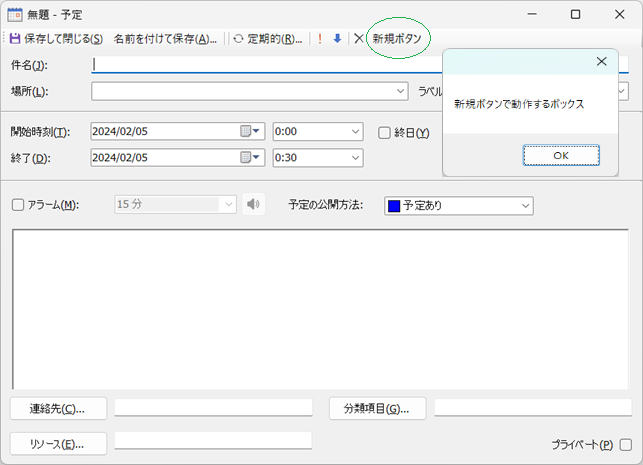
予定ダイアログのツールバーに新しい項目を追加するには、BeforeAppointmentCreateおよびBeforeAppointmentShowイベントを使用します。
既存の予定ダイアログはAppointmentFormクラスで参照できるので、これらのイベントでこのダイアログ上のコントロールの型がToolStripであるかどうかを調べ、該当する場合に新しいToolStripButtonを追加します。
以下に、「新規ボタン」という名前のボタンを追加し、そのクリック時にメッセージボックスを表示するサンプルを記載します。
◎サンプルコード(VB)
既存の予定ダイアログはAppointmentFormクラスで参照できるので、これらのイベントでこのダイアログ上のコントロールの型がToolStripであるかどうかを調べ、該当する場合に新しいToolStripButtonを追加します。
以下に、「新規ボタン」という名前のボタンを追加し、そのクリック時にメッセージボックスを表示するサンプルを記載します。
◎サンプルコード(VB)
Public Class Form1
    Dim currentAppointment As C1.C1Schedule.Appointment
    Dim _customAppointmentForm As C1.Win.C1Schedule.Forms.AppointmentForm

    Private Sub Form1_Load(sender As Object, e As EventArgs) Handles MyBase.Load

    End Sub

    Private Sub C1Schedule1_BeforeAppointmentCreate(sender As Object, e As C1.C1Schedule.CancelAppointmentEventArgs) Handles C1Schedule1.BeforeAppointmentCreate
        e.Cancel = True

        currentAppointment = New C1.C1Schedule.Appointment()
        currentAppointment.Start = Me.C1Schedule1.SelectedInterval.Start
        currentAppointment.[End] = Me.C1Schedule1.SelectedInterval.[End]
        Me.C1Schedule1.DataStorage.AppointmentStorage.Appointments.Add(currentAppointment)

        _customAppointmentForm = New C1.Win.C1Schedule.Forms.AppointmentForm(Me.C1Schedule1, currentAppointment)
        ModifyForm(_customAppointmentForm)
        _customAppointmentForm.ShowDialog(Me)
    End Sub

    Private Sub C1Schedule1_BeforeAppointmentShow(sender As Object, e As C1.C1Schedule.CancelAppointmentEventArgs) Handles C1Schedule1.BeforeAppointmentShow
        e.Cancel = True

        Me.C1Schedule1.DataStorage.AppointmentStorage.Appointments.Add(e.Appointment)
        _customAppointmentForm = New C1.Win.C1Schedule.Forms.AppointmentForm(Me.C1Schedule1, e.Appointment)
        ModifyForm(_customAppointmentForm)
        _customAppointmentForm.ShowDialog(Me)
    End Sub

    Public Sub ModifyForm(_appform As C1.Win.C1Schedule.Forms.AppointmentForm)
        Dim i As Integer = _appform.Controls.Count - 1

        For i = _appform.Controls.Count - 1 To 0 Step -1
            Dim c As Control = _appform.Controls(i)
            If c.[GetType]() Is GetType(ToolStrip) Then
                If c.Name.Equals("toolStrip1") Then
                    Dim btn As ToolStripButton = New ToolStripButton()
                    btn.Text = "新規ボタン"
                    AddHandler btn.Click, AddressOf CustomButton_Click
                    CType(c, ToolStrip).Items.Add(btn)
                End If
            End If
        Next
    End Sub

    Private Sub CustomButton_Click(sender As Object, e As EventArgs)
        If currentAppointment IsNot Nothing Then
            MessageBox.Show("新規ボタンで動作するボックス")
        End If
    End Sub
End Classnamespace prj_C1Schedule
{
public partial class Form1 : Form
{
C1.C1Schedule.Appointment currentAppointment;
C1.Win.C1Schedule.Forms.AppointmentForm _customAppointmentForm;
public Form1()
{
InitializeComponent();
}
private void c1Schedule1_BeforeAppointmentCreate(object sender, C1.C1Schedule.CancelAppointmentEventArgs e)
{
e.Cancel = true;
currentAppointment = new C1.C1Schedule.Appointment();
currentAppointment.Start = this.c1Schedule1.SelectedInterval.Start;
currentAppointment.End = this.c1Schedule1.SelectedInterval.End;
this.c1Schedule1.DataStorage.AppointmentStorage.Appointments.Add(currentAppointment);
_customAppointmentForm = new C1.Win.C1Schedule.Forms.AppointmentForm(this.c1Schedule1, currentAppointment);
ModifyForm(_customAppointmentForm);
_customAppointmentForm.ShowDialog(this);
}
private void c1Schedule1_BeforeAppointmentShow(object sender, C1.C1Schedule.CancelAppointmentEventArgs e)
{
e.Cancel = true;
this.c1Schedule1.DataStorage.AppointmentStorage.Appointments.Add(e.Appointment);
_customAppointmentForm = new C1.Win.C1Schedule.Forms.AppointmentForm(this.c1Schedule1, e.Appointment);
ModifyForm(_customAppointmentForm);
_customAppointmentForm.ShowDialog(this);
}
public void ModifyForm(C1.Win.C1Schedule.Forms.AppointmentForm _appform)
{
for (int i = _appform.Controls.Count - 1; i = 0; i += -1)
{
Control c = _appform.Controls[i];
if (c.GetType() == typeof(ToolStrip))
{
if (c.Name.Equals("toolStrip1"))
{
ToolStripButton btn = new ToolStripButton();
btn.Text = "新規ボタン";
btn.Click += CustomButton_Click;
((ToolStrip)c).Items.Add(btn);
}
}
}
}
private void CustomButton_Click(System.Object sender, System.EventArgs e)
{
if ((currentAppointment != null))
{
MessageBox.Show("新規ボタンで動作するボックス");
}
}
}
}