作成日: 2021/05/27 最終更新日: 2021/05/27
文書種別
使用方法
詳細
本コンポーネントには、ボタン要素のテキストの水平配置を、左揃え/右揃え/中央揃えにするための機能は用意されていません。
代替方法として、C1Ribbonのフォントを等幅フォントに設定し、ボタンのテキストに空白文字を適宜追加することで、水平配置の位置を調整する手法が考えられます。
代替方法として、C1Ribbonのフォントを等幅フォントに設定し、ボタンのテキストに空白文字を適宜追加することで、水平配置の位置を調整する手法が考えられます。
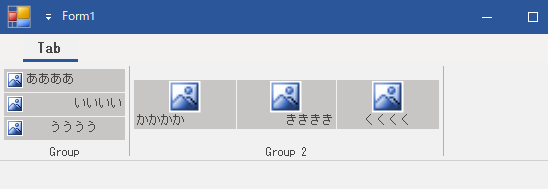
◎サンプルコード(VB)
        C1Ribbon1.Font = New Font("MS Gothic", 9, FontStyle.Regular)

        'TextImageRelation = Automatic(デフォルト)の場合
        RibbonButton1.Text = "ああああ    "  '左揃え
        RibbonButton2.Text = "    いいいい"  '右揃え
        RibbonButton3.Text = "  うううう  "  '中央揃え

        'TextImageRelation = ImageAboveTextの場合
        RibbonButton4.TextImageRelation = C1.Win.Ribbon.TextImageRelation.ImageAboveText
        RibbonButton5.TextImageRelation = C1.Win.Ribbon.TextImageRelation.ImageAboveText
        RibbonButton6.TextImageRelation = C1.Win.Ribbon.TextImageRelation.ImageAboveText
        RibbonButton4.Text = "かかかか    "  '左揃え
        RibbonButton5.Text = "    きききき"  '右揃え
RibbonButton6.Text = " くくくく " '中央揃え private void Form1_Load(object sender, EventArgs e)
{
c1Ribbon1.Font = new Font("MS Gothic", 9, FontStyle.Regular);
// TextImageRelation = Automatic(デフォルト)の場合
ribbonButton1.Text = "ああああ "; //左揃え
ribbonButton2.Text = " いいいい"; //右揃え
ribbonButton3.Text = " うううう "; //中央揃え
//TextImageRelation = ImageAboveTextの場合
ribbonButton4.TextImageRelation = C1.Win.Ribbon.TextImageRelation.ImageAboveText;
ribbonButton5.TextImageRelation = C1.Win.Ribbon.TextImageRelation.ImageAboveText;
ribbonButton6.TextImageRelation = C1.Win.Ribbon.TextImageRelation.ImageAboveText;
ribbonButton4.Text = "かかかか "; //左揃え
ribbonButton5.Text = " きききき"; //右揃え
ribbonButton6.Text = " くくくく "; //中央揃え
}